




No. Excel can be a perfectly valid source when direct integrations are unavailable. What matters is that the format is standardized and controlled. Automation is about predictability, not the technology used to create the source file.
What Does Incentive Automation Really Mean?
- Amit Jain
- Sep 16, 2026
- 4 min read
- Last updated on Sep 17, 2026
Introduction
Through the years, we have been part of many sales discussions and early-stage implementation conversations where one fundamental question keeps surfacing:
What exactly do we mean when we say a process is automated?
It sounds simple, but it isn't.
Sometimes automation is interpreted as, “We should be able to send the system anything, in any format, at any time, and it should figure everything out.”
At other times, replacing an Excel formula with a calculation engine is considered automation. Neither definition is quite right.
True incentive automation is about creating a repeatable, controlled and largely touchless operating process. Whether it's data ingestion to calculations, validations, approvals, reporting, queries, exceptions and downstream payout.
Technology is a critical part of that equation. But successful automation also requires the business process around the technology to become more structured.
Automation Does Not Mean Removing Structure. It Requires More Structure.
Consider something as simple as processing sales transactions. If every month the source team provides:
- January as Excel
- February as CSV
- March with different column names
- April with two new sheets
- May with a different interpretation of what constitutes a cancelled transaction
Then no software can reliably automate the process without introducing assumptions or human intervention. An automated process instead establishes a data contract.
The source may contain different transactions every month, different employees, different customers and different sales values, that is normal business variability. But the structure through which the data is communicated should remain predictable.
That distinction is fundamental: Automation should handle variability in business data. The underlying business logic shouldn’t have to be rebuilt every month.
The Basic Expectations from a Truly Automated Incentive Process
1. Predictable Data Availability
Automation starts with data.
An organization should know: When the data becomes available, where it will come from, what information it will contain, who owns it, what happens when it is late or incomplete, and what validations must happen before it is accepted.
Data does not necessarily need to originate from sophisticated enterprise systems. We routinely see successful automation using APIs, databases, SFTP feeds, cloud storage and even standardized Excel or CSV files.
The important word is standardized. If a monthly sales file has an agreed structure, the values can change indefinitely without requiring technology changes.
a) A new customer should not require configuration
b) A new transaction should not require configuration
c) A new employee should ideally flow through the roster process
d) A new sales value certainly should not require configuration
But changing the definition or structure of the underlying information may require changes.
2. Clear Business Rules
The second foundation is translating business policies into deterministic rules. For example:
- Sales × commission rate
- Achievement against quota
- Slab-based payouts
- Accelerators
- Caps and floors
- Product multipliers
- Collection adjustments
- Clawbacks
- Split credits
- Proration
- Eligibility
- Joining and exit rules
Once these rules are configured, the system should execute them consistently every cycle. Wherever possible, frequently changing variables should be parameterized rather than hard-coded.
Let’s say changing a commission rate from 1.5% to 1.75% should ideally mean changing a parameter, not redesigning the calculation. This is one of the most important principles of good automation: Design for expected change.
3. Master Data Must Be Managed as a Process
Incentive calculations are rarely dependent only on transactions. They also depend on employees, positions, managers, territories, branches, products, customers, quotas, eligibility, joining dates, transfers and organizational hierarchies.
These change constantly.
A properly automated environment therefore needs mechanisms to manage changes such as: new hires, exits, transfers, promotions, vacant positions, territory changes, manager changes, account reassignments and temporary responsibilities.
These should be effective-dated and auditable so the system understands not only what the organization looks like today, but what it looked like when a particular transaction occurred.
4. Periodic Runs Should Become Operationally Predictable
A monthly incentive cycle should not feel like a new project every month. Once automated, the operating calendar should become predictable:
Data arrives → validations run → exceptions are identified → calculations execute → results are reviewed → approvals happen → reports are released → payout output is generated
The same applies whether the organization calculates incentives monthly, weekly, quarterly or even daily. A mature system should support reruns when required without creating multiple uncontrolled versions of spreadsheets.
5. Validation Is Part of Automation
One misconception we frequently see is that automation means eliminating validation. It should actually make validation stronger.
Instead of someone manually comparing spreadsheets, the system should automatically identify issues such as: missing employees, unmapped products, duplicate transactions, invalid codes, unexpected volume changes, missing quotas, unusual payouts, negative values or reconciliation differences.
The objective is not: “Nobody checks anything anymore.”
The objective is: “People spend their time investigating exceptions instead of manually checking everything.”
6. Exceptions Should Be Designed Into the Process
Every incentive program has exceptions. That does not make it non-automatable.
The question is whether those exceptions are:
Rule-based exceptions that can themselves be automated, or
Judgment-based exceptions that need someone to make a decision
Consider a salesperson who should receive credit for an account outside their normal territory because they supported the deal. Trying to create increasingly complex calculation logic for every possible future circumstance may be counterproductive.
A better solution may be:
Request exception → provide justification → manager reviews → authorized person approves → system adjusts credit → complete audit trail
Automation therefore does not always mean eliminating human involvement. Sometimes it means orchestrating human involvement properly.
7. Governance Is Part of Automation, Not an Administrative Add-On
A calculation can be automated while the overall process remains highly manual.
If approvals happen over email, exceptions are sent over WhatsApp, and payout changes occur in Excel, the organization has automated only part of the problem.
True end-to-end automation should consider: plan, data, target & payout approvals, exception requests, discretionary adjustments, query management, plan acknowledgement, delegation, escalation and maker-checker controls.
Every important decision should ideally answer: Who changed what, when, why, and who approved it?
8. Reporting Should Be Designed for Different Consumers
The same underlying incentive data may need to be consumed very differently.
A salesperson may want: “What did I earn and why?”
A manager may want: “Who on my team is underperforming?”
Finance may want: “What is the total accrual?”
HR may want: “Are our plans creating the intended differentiation?”
Leadership may want: “Are incentives actually driving growth?”
Payroll may simply need:
Employee ID | Payout Amount | Pay Code
Automation should therefore separate the underlying information model from its presentation. One set of governed data should be capable of producing dashboards, detailed statements, Excel outputs, PDFs, mobile views, management summaries and downstream payroll files without separately rebuilding the calculation.
9. Output Formats Should Also Be Standardized
People usually focus heavily on input automation but overlook downstream automation. If payroll requires a particular file format every month, that format should be configured once and generated automatically.
If Finance needs a reconciliation report, it should become part of the standard cycle. If managers receive team reports, those should follow predictable schedules and access rules. Automation succeeds when both inputs and outputs become predictable.
10. Changes Should Be Classified Before They Occur
Not every change is equal. A mature automation platform and operating model distinguish between:
Data changes – normal business information changing
Parameter changes – values such as rates, thresholds, caps or dates changing
Configuration changes – existing business logic being modified
Structural changes – new plans, metrics, data sources or processes being introduced
This distinction matters because stakeholders sometimes expect every change to be instantaneous simply because the system is “automated.”
Automation reduces effort dramatically, but a new business requirement still needs to be understood, configured, validated and approved.
What Should Be Easy to Change?
A good implementation should identify what is likely to change and make those elements easy to configure.
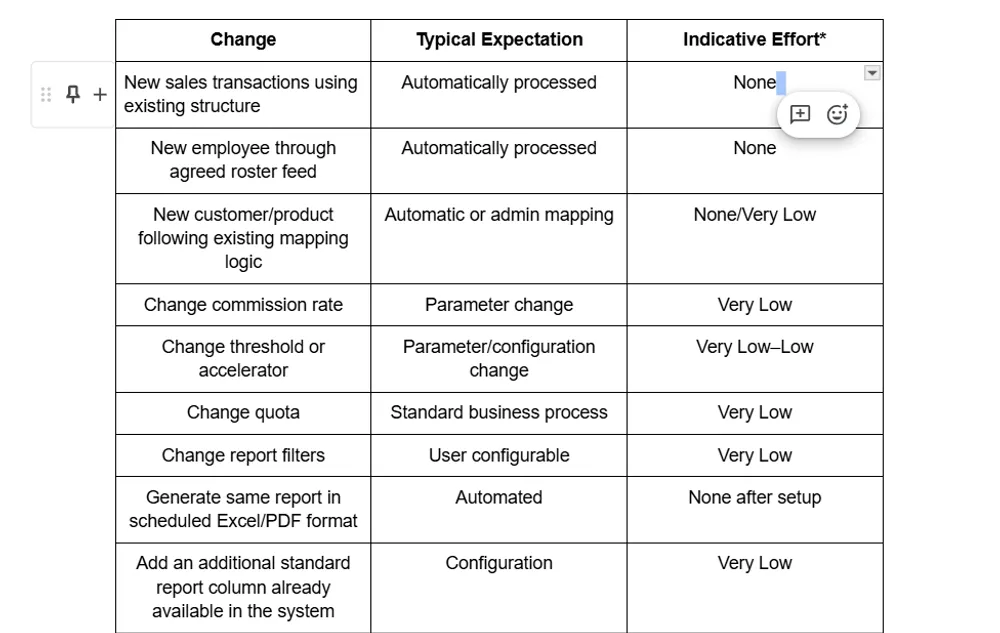
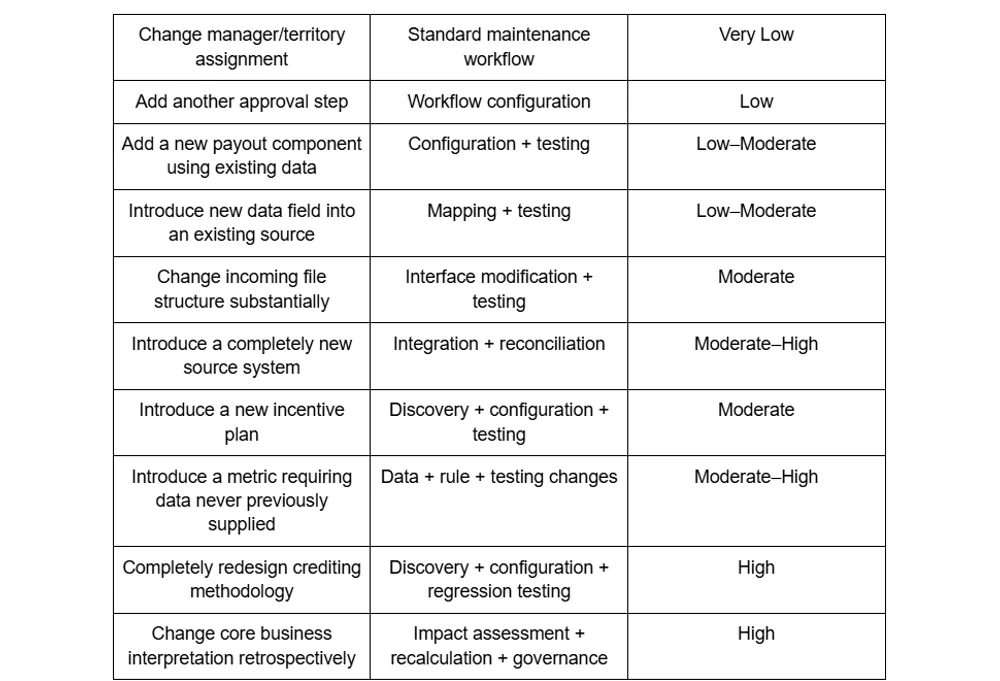
*Effort is indicative and refers primarily to system/configuration effort. Business approval, source-system changes, data preparation and UAT can affect timelines materially.
A useful principle is: Changing a value should be easy. Changing the meaning of the value naturally requires more work.
An Example: “Our Source File Changed. Why Can't the System Just Handle It?”
Suppose a system expects: Employee ID | Product | Sales | Transaction Date
Next month the source team sends: Salesperson Name | SKU | Net Revenue | Invoice Month
A human looking at the file may infer what happened. But should an enterprise system automatically assume that “Net Revenue” means “Sales”?
Should it assume the Salesperson Name uniquely identifies an employee?
Should Invoice Month replace Transaction Date?
Maybe. But making assumptions within a compensation process that ultimately affects someone's pay is dangerous. The right approach is to deliberately remap the changed structure, test it and then automate it going forward.
Predictability is not a technical limitation. It is an important control.
Automation Maturity: From Calculation to Operating System
Organizations typically progress through several stages.
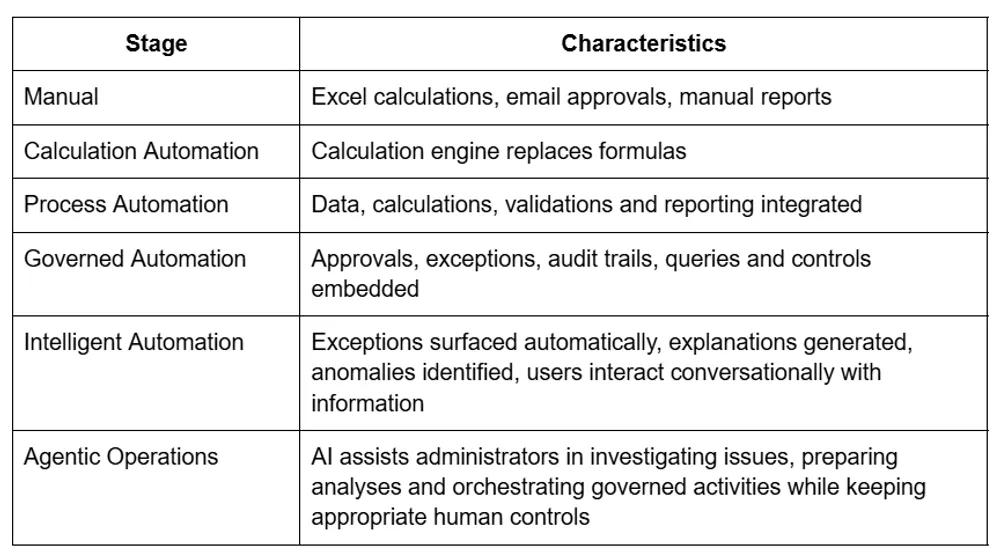
This is why we increasingly encourage organizations not to ask:
“Can you automate our incentive calculation?”
Instead ask:
“How much of our incentive operating process can become repeatable, controlled and self-operating?”
What Does the Client Need to Do for Automation to Succeed?
Technology providers also need the organization to make several decisions.
There should be agreement on the meaning of data fields, source-system ownership, cut-off dates, calculation calendar, exception policies, validation thresholds, approval responsibilities, output formats, retrospective adjustment policies and change-management processes.
None of these is technology limitations. They are what convert tribal knowledge into an institutionalized process. And that is ultimately one of the biggest benefits of automation.
The incentive process stops depending on somebody remembering what happened last month.
The Principle We Use at Incentivate
At Incentivate, we think of incentive automation as much more than replacing an Excel calculation. The aspiration should be:
a) Automate what is predictable
b) Parameterize what changes frequently
c) Configure what is business-specific
d) Govern what requires judgment
e) Flag what is exceptional
f) Make everything traceable
When these principles come together, automation does more than save processing time. It creates a process that is scalable, auditable and significantly easier for the organization to operate.
Frequently Asked Questions
Does automation mean we cannot use Excel as an input?
Do input files have to contain exactly the same data every month?
No. The records and values should naturally change. The structure and meaning of the fields should remain consistent unless a deliberate change is made.
What happens if we add new transactions?
Nothing needs to change if they follow existing business rules. This is exactly the type of variability an automated system should handle.
What happens if we add new employees?
If the employee arrives through the agreed roster/HR feed with the required attributes, the process should generally be automatic.
What happens if the source changes a column name?
If the interface depends on the existing column name, the mapping may need to be updated. This is normally a small change, but it should be deliberate rather than guessed by the system.
What if an entirely new field is added?
If it is informational and not used by any process, the change may be minimal. If it becomes part of eligibility, crediting, calculation or reporting logic, mapping, configuration and testing may be required.
What if we change from Excel to API integration?
That is an interface change. Business calculations may remain untouched, but the new integration needs to be built/configured, reconciled and tested.
Can the system run automatically every month?
Yes. Once availability, timing and dependencies are predictable, data ingestion, validation, calculations and report generation can be scheduled.
Can we run calculations outside the normal cycle?
Yes. Mature incentive platforms should support on-demand processing, assuming the required data for that period is available.
Can we rerun incentives after fixing data?
Yes. Reruns should be controlled and versioned so administrators know which run is current and what changed between versions.
If a commission rate changes, does it require development?
Ideally, no. Frequently changing variables such as rates, thresholds, caps, floors and dates should be parameterized wherever practical.
What if the entire calculation logic changes?
That is no longer merely a parameter change. The new requirement needs configuration and testing. Depending on its complexity and data requirements, effort could range from low to significant.
What if we introduce a new incentive component?
If it uses data already available and standard calculation constructs, effort may be relatively small. If it requires new data, complex allocation rules or additional workflows, effort increases.
What if we introduce an entirely new incentive plan?
The plan should go through requirements discovery, configuration, test scenario creation, UAT and deployment. Automation does not eliminate proper change management.
Can we create person-specific exceptions?
Yes. But the best solution depends on why the exception exists. Repeatable exceptions should become rules or parameters. One-off discretionary exceptions are often better handled through governed workflows.
Do we need to create hundreds of plans to handle local variations?
Not necessarily. Good architecture often separates the base plan from configurable parameters and exception rules. This can allow variations by employee, role, territory, branch, geography or period without cloning an entire plan.
Can managers approve exceptions within the platform?
Yes. Approval workflows can be designed around organizational hierarchy, roles, values, exception types or other business conditions.